
Meta Horizon
Screenshots

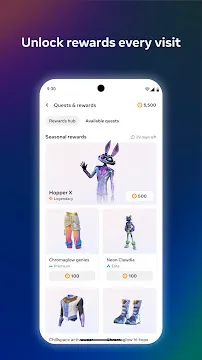

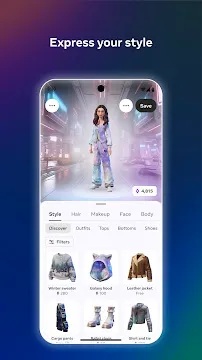
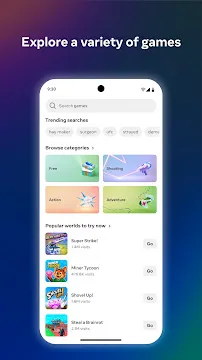
Meta Horizon is the official companion tool for virtual reality users. This tool connects your mobile device directly to your virtual reality headset. Therefore, you can manage your virtual profile easily from anywhere. Many people use the app to browse new content. Additionally, you can connect with friends before entering virtual reality.
The app makes your transition into virtual spaces smooth. Consequently, you save time when you put on your headset. You can adjust settings directly on your phone screen. Furthermore, the platform helps you stay updated on virtual reality trends. You can follow your favorite virtual creators easily.
What is Meta Horizon?
Meta Horizon represents a primary bridge between your physical phone and your virtual reality equipment. This software helps you stay connected to your digital life. You can access many options without turning on your headset.
Specifically, the platform offers two main benefits:
- First, the app provides access to a massive library of virtual experiences.
- Second, the software allows you to control your account privacy settings.
Security is very important for virtual users. Therefore, Meta Horizon offers tools to protect your personal data. You can choose who sees your online status. Furthermore, you can manage your child’s account settings safely. This feature gives parents peace of mind. Then, you can explore customizable settings for your hardware. You do not need to wear the headset to change options. Because of this feature, managing your virtual profile is highly convenient.
Seamless VR Device Management
Managing your virtual hardware does not have to be difficult. Meta Horizon simplifies the entire configuration process. For example, you can pair your phone with your headset via Bluetooth. Then, you can manage your local storage space remotely.
You can check how many gigabytes your games use. If your storage is full, you can delete old software. This action happens directly from your mobile interface. Additionally, you can monitor your battery levels easily. You will always know when your headset needs charging.
Consequently, you can avoid sudden shutdowns during your gameplay. Furthermore, you can update your headset software over Wi-Fi. This ensures your system always has the latest security patches. Therefore, your hardware remains optimized for the best possible performance.
Enhancing Your Social Experience
Socializing is a major part of modern virtual spaces. Meta Horizon helps you maintain your friendships outside of virtual reality. First, you can see which friends are online right now. Then, you can send them text messages instantly.
This feature makes coordinating group play sessions very simple. Additionally, you can create group chats for your gaming team. You can discuss strategies before the match begins. Furthermore, the app allows you to send event invitations.
You can invite friends to virtual concerts or meetups. Consequently, you never miss a chance to hang out together. If you meet new people in virtual reality, you can add them here. Your social network grows naturally because of these features.
Additionally, the software features community feeds where players share clips. You can like and comment on these public posts. Consequently, you can find new communities that share your specific interests. This interaction makes the whole ecosystem feel alive and friendly.
Discovering New Virtual Content
Finding fresh entertainment is easy with the right tools. Meta Horizon includes a comprehensive store for virtual experiences. You can scroll through thousands of titles on your phone. For instance, you can read reviews from other community members.
These reviews help you choose the best games. Additionally, you can view high-quality screenshots and promotional trailers. You can see exactly what to expect before buying. Furthermore, the store organizes titles into clear categories.
You can search for action, puzzles, or fitness options. When you find a good title, you can add it to your wishlist. Then, the app notifies you when that title goes on sale. This feature helps you save money on your purchases.
Furthermore, you can find special deals directly on the store dashboard. The app frequently lists discounts on popular multiplayer games. Therefore, checking the store regularly is a good habit. You can expand your collection without spending too much money.
Staying Safe with Meta Horizon
Online safety is a critical priority for everyone in virtual spaces. Meta Horizon provides several features to protect your digital well-being.
Specifically, you can access these protective options:
- First, you can block or report toxic users instantly.
- Second, you can customize your personal boundary settings.
- Third, parents can monitor activity through safety controls.
These boundaries prevent strangers from getting too close to your avatar. Additionally, you can set daily time limits for younger players. Furthermore, you can restrict specific content based on age ratings. Consequently, your family can enjoy virtual reality without unnecessary risks. Therefore, using these tools ensures a secure and pleasant experience.
Why the Meta Horizon Ecosystem Matters
A unified system makes technology much better for everyone. The Meta Horizon ecosystem connects multiple platforms into a single experience. For example, your avatar looks the same on your phone and in virtual reality.
This consistency helps you maintain your unique digital identity. Additionally, the platform integrates smoothly with your existing social media profiles. You can share your achievements with your family easily.
Furthermore, the ecosystem supports cross-play features for many games. You can play with people on different devices. Therefore, the community remains large and active. Because the ecosystem is growing, developers create better content frequently. You will always find something new to experience in this virtual space.
Key Features of Meta Horizon
Meta Horizon includes many useful tools for virtual reality enthusiasts. These tools improve how you interact with your hardware and friends. Here is a detailed breakdown of the main options available inside the app.
Effortless Headset Configuration
Setting up a new VR device can feel complicated at first. However, Meta Horizon guides you through each step of the process. The app uses clear visual instructions on your phone screen. First, you turn on your Bluetooth connection. Then, the app automatically detects your nearby hardware. You can connect your device to your home Wi-Fi network next. This initial setup takes only a few minutes. Consequently, you can start playing your favorite games much faster.
Remote Game Installation
You do not need to wait around for games to download. Meta Horizon allows you to purchase games while you are away from home. Then, you can initiate the installation process remotely. Your headset will download the game automatically over Wi-Fi. Therefore, the game is ready when you put on your headset. This feature is perfect for busy individuals. You can manage your gaming library during your work break. Finally, you can jump straight into the action later.
Detailed Avatar Customization
Your digital appearance reflects your personality in virtual worlds. Meta Horizon offers an extensive character creator tool. Specifically, you can modify your avatar’s facial features and hair color. You can also choose from a wide variety of clothing styles. The app updates your look across all connected spaces instantly. Additionally, you can unlock special outfits by completing in-game challenges. Consequently, you can always look unique during your social interactions.
Real-Time Screen Casting
Sharing your virtual adventures with people in the real room is fun. Meta Horizon features a built-in casting function for this purpose. You can stream your headset’s view directly to your phone screen. Alternatively, you can cast the feed to a compatible television. This allows your friends to see exactly what you see in real time. Therefore, virtual reality becomes a group entertainment experience. It is a great feature for parties and family gatherings.
Direct Social Chatting
Communication is vital for keeping up with your online community. Meta Horizon includes a dedicated messaging tab for quick conversations. You can send text messages to individual friends or large groups. Furthermore, the app supports voice calls through your phone’s microphone. You can talk to your friends without wearing your heavy headset. This feature helps you stay in touch throughout the day. Consequently, you can maintain close bonds with your gaming friends.
Conclusion
Meta Horizon is an essential tool for anyone who owns a modern VR device. The app makes managing your virtual profile simple and fast. Additionally, it bridges the gap between your physical phone and virtual worlds.
You can organize your library, customize your avatar, and chat with friends easily. Therefore, the app enhances your entire virtual reality experience. If you want to maximize your hardware’s potential, this tool is necessary. Download the app today to upgrade your digital journey.